
Industry · Pest Control
Reply to pest control message leads before the customer contacts the next company.
Someone who just saw a rodent in the kitchen will message more than one company within minutes. InstantResponse.AI replies first, identifies the pest and the property, and hands your team a qualified request that is ready to schedule.
A steady intake layer for pest control message leads, grounded in the treatment list, recurring plans, and service coverage you configure.
In short
InstantResponse.AI operates as an AI front desk for pest control companies. It answers message leads from Google Local Services Ads, Yelp, and Thumbtack in seconds, asks your configured questions about pest type, where it was seen, property size, pets and children in the home, and recurring plan interest, then notifies your team by email, SMS, or WhatsApp.
Pest control job types
Which pest inquiries does the AI qualify?
A wasp nest, a bed bug report, and a termite inspection need different team follow-up on different timelines. Each job type below has its own configured questions and urgency grade.
Rodent activity
UrgentDroppings, noises in the attic, or a sighting inside the home.
Wasps, hornets, and bees
EmergencyAn active nest near a doorway, play area, or work site.
Bed bugs
UrgentBites, spotting on bedding, or a report from a tenant.
Termite inspection and escrow
UrgentSwarmers, damage found, or an inspection needed for a sale.
Recurring service plans
StandardA homeowner or landlord asking about quarterly or monthly coverage.
Commercial and food service
UrgentRestaurants, warehouses, or property managers with compliance pressure.
Coverage and pricing questions
StandardSomeone checking whether you serve their address and what a treatment costs.
Lead playbook
What does your team receive?
The pest control playbook: what the customer reports, what the AI asks, how the job is graded, and what reaches your scheduling desk.
| Lead type | Information collected | Classification | How the customer is handled | What your team gets |
|---|---|---|---|---|
| Rodent activity | Where activity was seen, how long it has been happening, property size, attic or crawlspace access, and pets in the home. | Urgent | Records what the customer observed and gives no treatment or bait guidance of any kind. | Your team receives a scoped, ready-to-work thread. |
| Wasps, hornets, and bees | Nest location and height, activity level, allergies in the household, and access. | Emergency | Escalates on the allergy and location rules you configure. | Same-day requests are flagged for the team member you designate. |
| Bed bugs | Rooms affected, how long, bed count, prior treatments, and building type. | Urgent | Follows the discretion and preparation policy you configure. | Your team receives a scoped, ready-to-work thread. |
| Termite inspection and escrow | Property age and type, evidence seen, closing deadline, and report requirements. | Urgent | Captures escrow deadlines and defers any damage assessment to your licensed inspector. | Time-sensitive escrow work flagged before the deadline tightens. |
| Recurring service plans | Property size, current issues, coverage preference, and billing contact. | Standard | Presents the plan tiers and pricing you configure. | Interest in a recurring plan captured during the first conversation. |
| Commercial and food service | Site type, inspection or audit deadline, service window, and documentation needs. | Urgent | Applies your commercial rules so audit-driven work reaches your commercial team. | Compliance-driven accounts flagged for the manager you designate. |
| Coverage and pricing questions | Address or zip code, pest reported, property size, and timing. | Standard | Answers from the service area and rate-card information you configure. | Price shoppers qualified with your configured questions before your team follows up. |
Rodent activity
Urgent- Information collected
- Where activity was seen, how long it has been happening, property size, attic or crawlspace access, and pets in the home.
- How the customer is handled
- Records what the customer observed and gives no treatment or bait guidance of any kind.
- What your team gets
- Your team receives a scoped, ready-to-work thread.
Wasps, hornets, and bees
Emergency- Information collected
- Nest location and height, activity level, allergies in the household, and access.
- How the customer is handled
- Escalates on the allergy and location rules you configure.
- What your team gets
- Same-day requests are flagged for the team member you designate.
Bed bugs
Urgent- Information collected
- Rooms affected, how long, bed count, prior treatments, and building type.
- How the customer is handled
- Follows the discretion and preparation policy you configure.
- What your team gets
- Your team receives a scoped, ready-to-work thread.
Termite inspection and escrow
Urgent- Information collected
- Property age and type, evidence seen, closing deadline, and report requirements.
- How the customer is handled
- Captures escrow deadlines and defers any damage assessment to your licensed inspector.
- What your team gets
- Time-sensitive escrow work flagged before the deadline tightens.
Recurring service plans
Standard- Information collected
- Property size, current issues, coverage preference, and billing contact.
- How the customer is handled
- Presents the plan tiers and pricing you configure.
- What your team gets
- Interest in a recurring plan captured during the first conversation.
Commercial and food service
Urgent- Information collected
- Site type, inspection or audit deadline, service window, and documentation needs.
- How the customer is handled
- Applies your commercial rules so audit-driven work reaches your commercial team.
- What your team gets
- Compliance-driven accounts flagged for the manager you designate.
Coverage and pricing questions
Standard- Information collected
- Address or zip code, pest reported, property size, and timing.
- How the customer is handled
- Answers from the service area and rate-card information you configure.
- What your team gets
- Price shoppers qualified with your configured questions before your team follows up.
Illustrative example
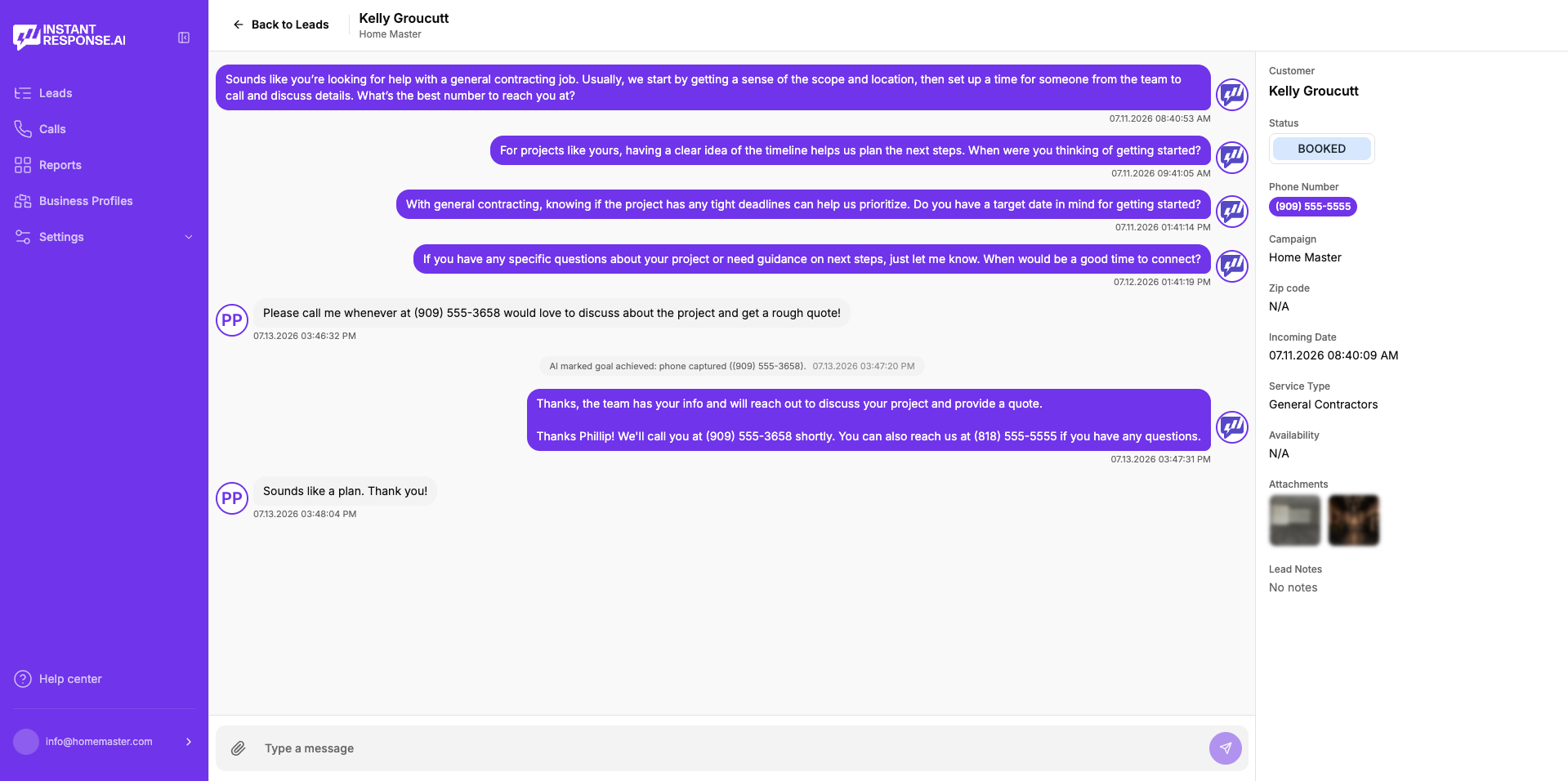
What does a pest inquiry look like?
Read this carefully
An immediate reply, your configured pest, location, and sensitivity questions, and a notification that reaches your technician team with the details a treatment plan needs.
How it works
How it works for a pest control company
Four steps, using only lead sources and outcomes supported today.
Connect your connected lead sources
Message leads from Google Local Services Ads, Yelp, and Thumbtack land in one inbox.
Load your pest control playbook
Treatment list, recurring plans, service coverage, hours, and the intake questions your office asks on each pest type.
The AI replies and grades the job
An immediate reply goes out, pest and property questions get asked, and follow-up continues until the customer responds or opts out.
Your team schedules the visit
Notifications arrive by email, SMS, or WhatsApp, a person can join the thread at any point, and outcomes can be pushed onward through Zapier and/or webhooks.
Google LSA call intelligence
Reviewing Google LSA pest control calls
Panicked first calls carry detail a form rarely captures. Eligible Google Local Services Ads calls available in the connected account can be replayed, read, and summarized inside InstantResponse.AI.
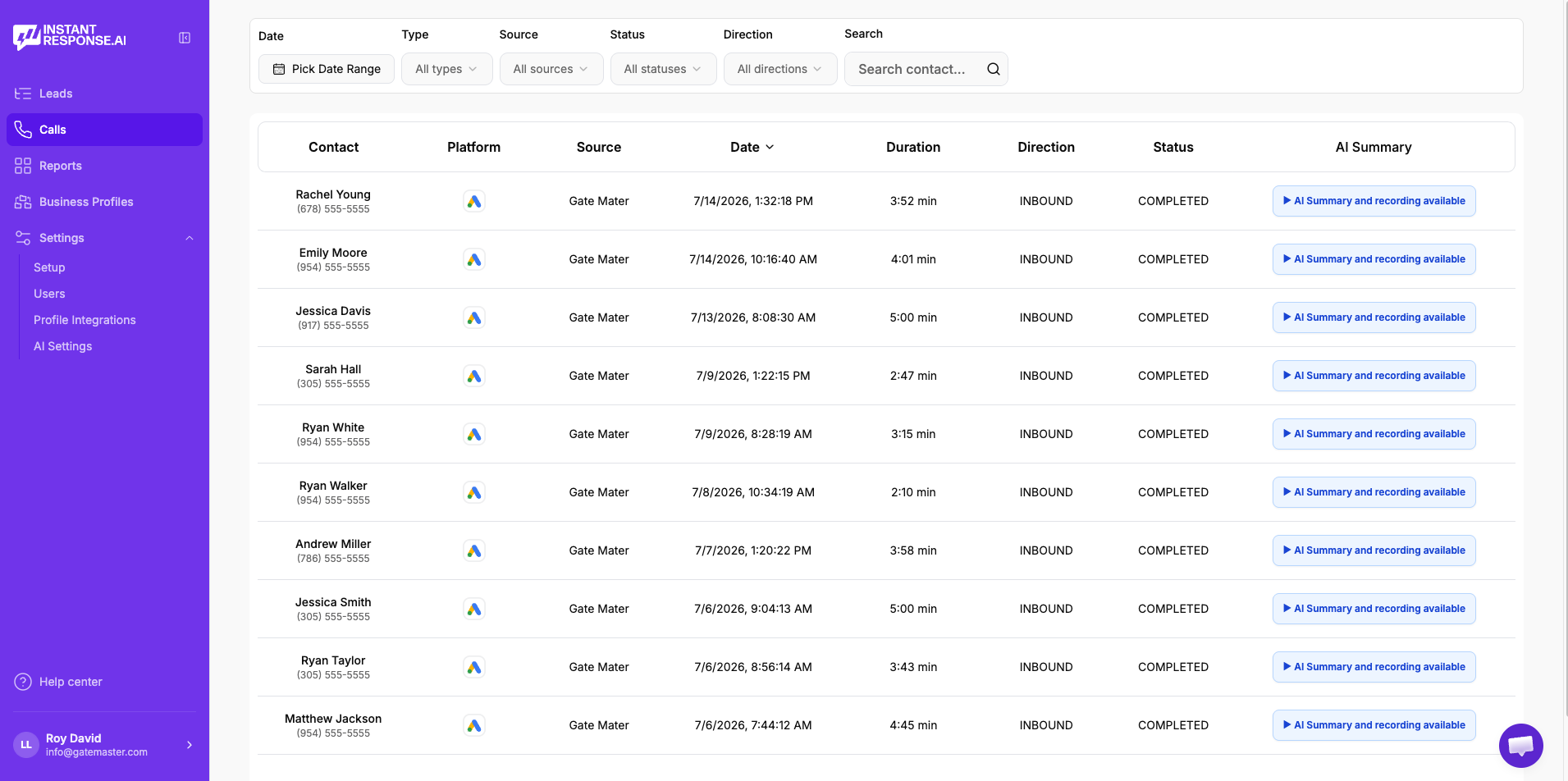
Play the recording
Listen to the original Google LSA call without leaving the product.
Read the transcript
Skim the conversation instead of replaying the whole call.
Review the AI summary
See what the customer needed and what was discussed, in a few lines.
Check the duration
Spot the short, low-quality calls that are worth reviewing or disputing.
- Included in all pricing plans. Currently available specifically for Google Local Services Ads calls.
- See the full Google LSA workflow →
FAQ
Pest control lead response questions
- Message leads from Google Local Services Ads, Yelp, and Thumbtack are answered within seconds, which is usually before the customer finishes messaging your competitors.
- No. It records what the customer describes and asks your configured follow-up questions. Identification stays with your licensed technician on site.
- Treatment and product decisions stay with your licensed technicians, and the AI captures the pest, location, and sensitivity detail they need to make the call.
- It presents the plan tiers and pricing you configure and captures interest, so your office follows up on a warm conversation.
- Restaurants, warehouses, and managed properties follow your commercial notification rules and reach the manager you designate, with audit deadlines captured in the thread.
- Yes. Threads are shared and any team member can take over silently at any point, so the customer keeps a single conversation.
Related
Related resources for pest control teams
Where most pest control leads and reviewable calls originate.
Why answering first decides who gets the treatment booked.
Everything the AI front desk does across your lead sources.
Plans, included Google LSA call intelligence, and onboarding detail.
A recurring-service trade with a similar intake rhythm.
How teams use recordings, transcripts, and AI summaries.
How an AI front desk compares with a traditional answering service.
How automatic replies to message leads work end to end.
Voice AI on your existing number and full calendar booking are in Beta. Everything else described on this page is live today.
See it handle a live pest inquiry.
Bring a recent rodent, bed bug, or termite message to a 15-minute demo and watch the questions asked and the summary your team would have received.