
Industry · Locksmiths
Reply to lockout message leads before the next locksmith does.
Someone standing outside a car at midnight contacts more than one locksmith at once. InstantResponse.AI replies to message leads right away, captures the exact location and lock detail, and notifies your team with the full thread.
A first responder for locksmith message leads, grounded in the coverage radius, service list, and call-out information you configure.
In short
InstantResponse.AI is an AI front desk for locksmith companies. It replies to message leads from Google Local Services Ads, Yelp, and Thumbtack within seconds, asks your configured lockout questions about location, lock or vehicle type, and proof of ownership, then notifies your mobile locksmiths by email, SMS, or WhatsApp so a person can take the job.
Locksmith lead types
Which locksmith requests does the AI handle?
A car lockout, a commercial rekey, and a safe opening need different questions and different people. Each request type below carries its own question set, urgency rule, and notification path.
Vehicle lockout
EmergencyKeys locked in a car, or a key lost away from home.
Home or apartment lockout
EmergencyA resident locked out of a house, apartment, or unit door.
Rekey and lock change
StandardA move-in, a tenant turnover, or a lost key that calls for new keying.
Commercial and master key work
UrgentAn office, retail site, or property manager needing master keying or access hardware.
Safe and high-security work
UrgentA safe that will not open, or a high-security cylinder request.
Automotive key and fob programming
StandardA replacement transponder key, fob, or push-to-start remote.
Coverage and call-out questions
StandardSomeone checking whether you serve their address and what the trip costs.
Lead playbook
What gets captured before a locksmith rolls?
This is the locksmith playbook: what the customer wants, what the AI asks, how the request is graded, and what lands in your team's hands.
| Lead type | Information collected | Classification | How the customer is handled | What your team gets |
|---|---|---|---|---|
| Vehicle lockout | Vehicle year, make, model, exact location, whether anyone or a pet is inside, and proof-of-ownership readiness. | Emergency | Asks whether a person or animal is inside and follows your escalation rules for that answer. No entry technique is described. | Your team is notified with location and vehicle detail already gathered. |
| Home or apartment lockout | Address, door and lock type, whether the customer can prove residency, and time on site. | Emergency | Requests the ownership or tenancy proof your policy requires before anyone is sent out. | A verified-intent thread with the location and lock detail already captured. |
| Rekey and lock change | Number of doors, lock brands, keyed-alike preference, and preferred window. | Standard | Quotes only from the call-out and rate-card information you configure and defers unusual hardware to your team. | A scoped rekey request with door count captured up front. |
| Commercial and master key work | Site address, door count, existing hardware, purchase-order needs, and after-hours access. | Urgent | Applies your commercial rules to account and property work. | Managed-property thread notification sent to the account owner you designate. |
| Safe and high-security work | Safe make, lock style, whether the combination is known, and site access. | Urgent | Confirms the ownership questions your policy requires before anyone is dispatched by your team. | A specialist request flagged for the team member you designate for safe work. |
| Automotive key and fob programming | Vehicle details, whether a working key exists, VIN availability, and current location. | Standard | Checks the key availability questions you configure so your tech arrives with the right blank. | A programming job with vehicle data ready before the van is loaded. |
| Coverage and call-out questions | Address or zip code, job type, and how soon they need someone. | Standard | Answers from the coverage radius and rate-card information you configure. | Out-of-area requests are filtered before a locksmith drives. |
Vehicle lockout
Emergency- Information collected
- Vehicle year, make, model, exact location, whether anyone or a pet is inside, and proof-of-ownership readiness.
- How the customer is handled
- Asks whether a person or animal is inside and follows your escalation rules for that answer. No entry technique is described.
- What your team gets
- Your team is notified with location and vehicle detail already gathered.
Home or apartment lockout
Emergency- Information collected
- Address, door and lock type, whether the customer can prove residency, and time on site.
- How the customer is handled
- Requests the ownership or tenancy proof your policy requires before anyone is sent out.
- What your team gets
- A verified-intent thread with the location and lock detail already captured.
Rekey and lock change
Standard- Information collected
- Number of doors, lock brands, keyed-alike preference, and preferred window.
- How the customer is handled
- Quotes only from the call-out and rate-card information you configure and defers unusual hardware to your team.
- What your team gets
- A scoped rekey request with door count captured up front.
Commercial and master key work
Urgent- Information collected
- Site address, door count, existing hardware, purchase-order needs, and after-hours access.
- How the customer is handled
- Applies your commercial rules to account and property work.
- What your team gets
- Managed-property thread notification sent to the account owner you designate.
Safe and high-security work
Urgent- Information collected
- Safe make, lock style, whether the combination is known, and site access.
- How the customer is handled
- Confirms the ownership questions your policy requires before anyone is dispatched by your team.
- What your team gets
- A specialist request flagged for the team member you designate for safe work.
Automotive key and fob programming
Standard- Information collected
- Vehicle details, whether a working key exists, VIN availability, and current location.
- How the customer is handled
- Checks the key availability questions you configure so your tech arrives with the right blank.
- What your team gets
- A programming job with vehicle data ready before the van is loaded.
Coverage and call-out questions
Standard- Information collected
- Address or zip code, job type, and how soon they need someone.
- How the customer is handled
- Answers from the coverage radius and rate-card information you configure.
- What your team gets
- Out-of-area requests are filtered before a locksmith drives.
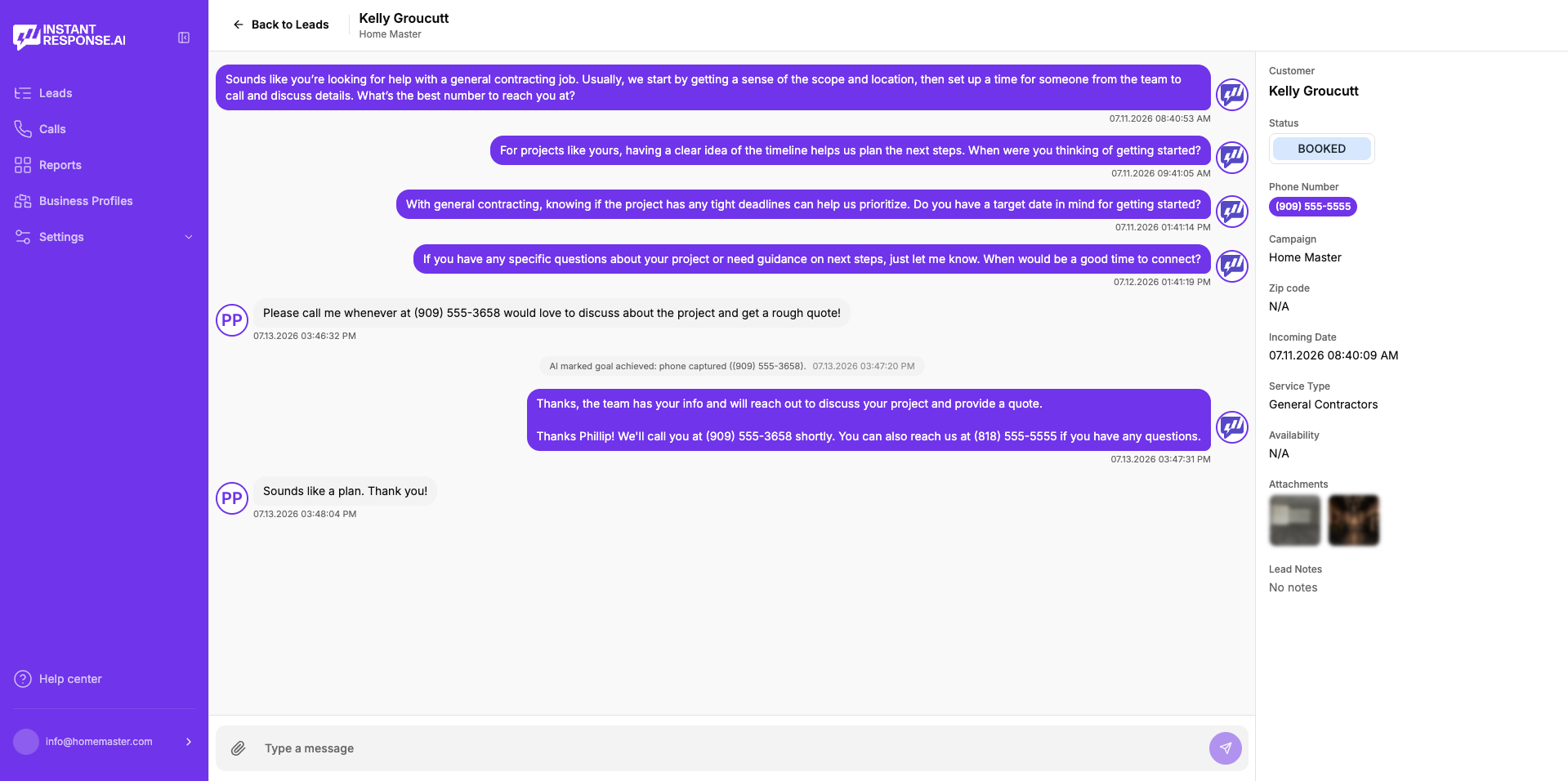
Illustrative example
What does a lockout conversation look like?
Read this carefully
An immediate reply, the location and lock questions you configure, and a notification that puts a ready-to-work thread in your team's hands while the customer is still waiting.
How it works
How it works for a locksmith business
Four steps, from the first message to a qualified thread waiting for your team.
Connect your connected lead sources
Message leads from Google Local Services Ads, Yelp, and Thumbtack arrive in one inbox.
Load your locksmith playbook
Your coverage radius, service list, call-out information, hours, and the ownership questions your office already asks.
The AI replies and pins down the job
An immediate reply goes out, location and lock questions get asked, and follow-up continues until the customer answers or opts out.
Your locksmith takes the thread over
Notifications reach the right person by email, SMS, or WhatsApp, a human can step in at any moment, and outcomes can be pushed onward through Zapier and/or webhooks.
Google LSA call intelligence
Reviewing Google LSA lockout calls
Emergency locksmith work arrives by phone more than most trades. Eligible Google Local Services Ads calls available in the connected account can be replayed, read as a transcript, and summarized inside InstantResponse.AI.
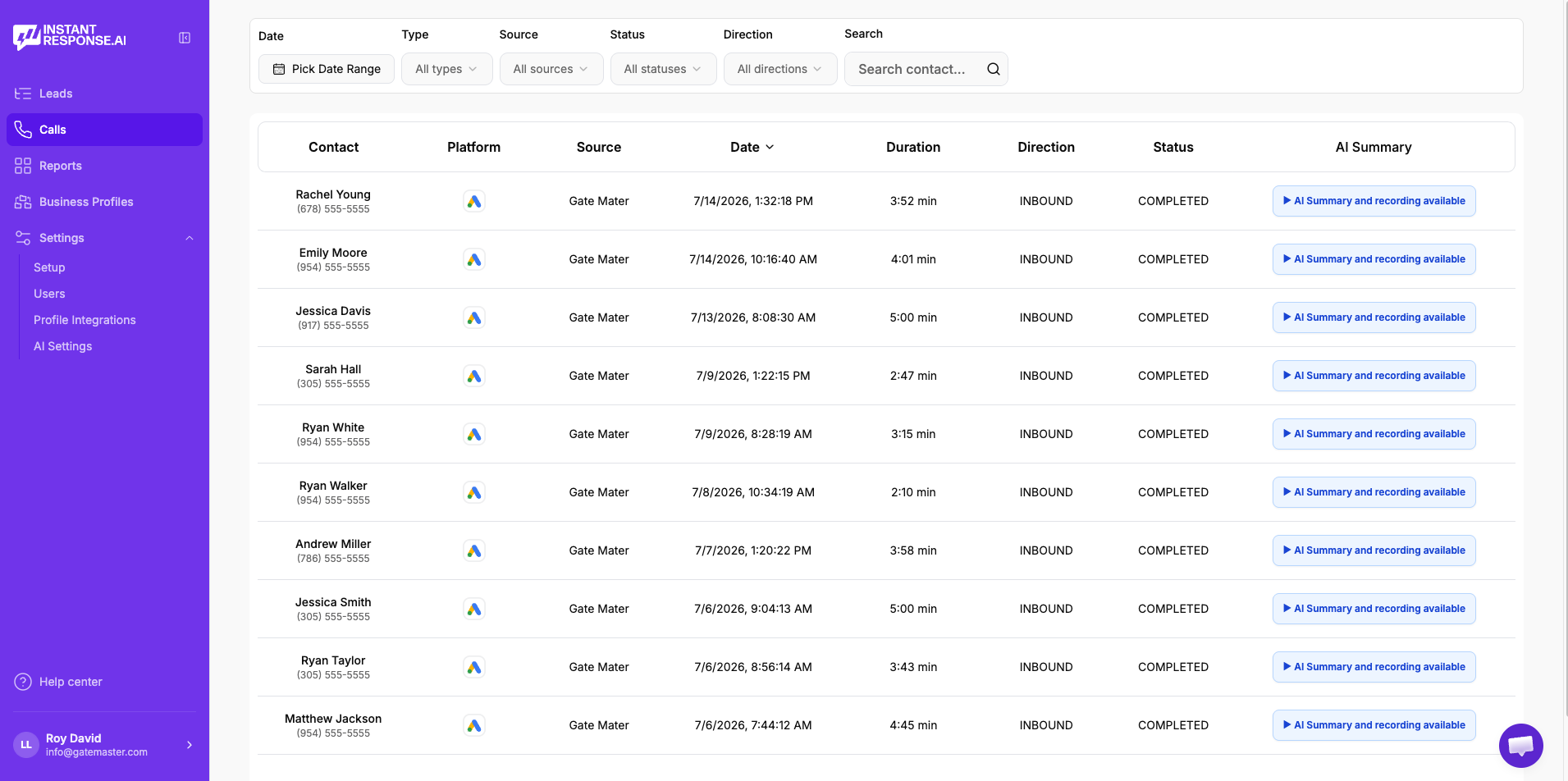
Play the recording
Listen to the original Google LSA call without leaving the product.
Read the transcript
Skim the conversation instead of replaying the whole call.
Review the AI summary
See what the customer needed and what was discussed, in a few lines.
Check the duration
Spot the short, low-quality calls that are worth reviewing or disputing.
- Included in all pricing plans. Currently available specifically for Google Local Services Ads calls.
- See the full Google LSA workflow →
FAQ
Locksmith lead response questions
- Message leads from Google Local Services Ads, Yelp, and Thumbtack receive a reply within seconds at any hour, using the questions and tone you configure.
- It asks the ownership or tenancy questions your policy defines and records the answers in the thread. The final decision always stays with your locksmith on site.
- Yes. It answers from the rate-card information you configure, which clears most price questions before a locksmith picks the job up.
- It asks that question first and follows the escalation rule you configure for it, which usually means an immediate notification plus your emergency-services guidance.
- Yes. Every thread is shared, and a team member can step in silently at any point. The handoff is seamless for the customer.
- Eligible Google LSA calls are recorded, transcribed, and summarized inside the product, so you can replay the call, skim the transcript, and read the summary in one place.
Related
Related resources for locksmith teams
Where most emergency locksmith leads and reviewable calls originate.
Why the first useful reply usually wins the lockout.
Everything the AI front desk does across your lead sources.
Plans, included Google LSA call intelligence, and what onboarding covers.
A neighbouring trade with the same on-the-spot urgency.
The evidence behind fast first responses for local service businesses.
How an AI front desk compares with a traditional answering service.
How automatic replies to message leads work end to end.
Voice AI on your existing number and full calendar booking are in Beta. Everything else described on this page is live today.
See how it would handle your next lockout inquiry.
Bring a recent lockout or rekey message to a 15-minute demo and watch the reply, the questions, and the notification your locksmith would have received.