

Google Local Services Ads integration
Google LSA Auto Responder: answer message leads while they're hot.
Stop paying for leads nobody answers. AI replies to your Local Services Ads message leads in seconds, 24/7, asks your questions, rates and disputes leads, and gives you the recording, transcript and AI summary of your LSA calls.
From $99/mo · Unlimited leads · 14-day free trial · No contracts
 Google Partner
InstantResponse.AI is a product by Cohen Marketing, a Google Partner.

Demo Garage Doors - New LSA lead qualified!
Customer: R. K.
Phone: (555) 010-0177
Service: Broken spring, double door
Source: Google Local Services Ads
Last updated: · Reviewed by Eliad Cohen
The InstantResponse.AI Google LSA Auto Responder replies to your Local Services Ads message leads in seconds, 24/7, asks only the questions you've approved and gives you the recording, transcript and AI summary of your LSA calls. Plans start at $99/month with a 14-day free trial, and setup takes about 10 minutes. Compare →
Definition
What is a Google LSA auto responder?
A Google LSA auto responder answers a new Local Services Ads message lead the moment it arrives, instead of whenever someone opens the LSA app. It greets the customer, uses the details already in the lead, asks your qualifying questions, and moves the job toward a booked appointment.
InstantResponse.AI replies using the business details you set up: services, service area, hours, qualifying questions and, if you want, prices. When a conversation needs a person, anyone on your team can take over with the full history in front of them. The AI can collect preferred appointment times for your team to confirm; full calendar booking is in Beta, so confirm availability during your demo.
Carpet Clean Expert uses InstantResponse.AI to answer Google LSA message leads without a full-time coordinator. The AI asks for square footage, fiber type and pet or stain notes, then passes the customer's preferred time to the team.
Paid per lead
What happens when an LSA message lead arrives.
With Local Services Ads you pay for leads, not clicks, and message leads arrive at all hours. Each one gets a useful reply while the customer is still choosing who to hire.
Message lead arrives
A customer messages your Local Services Ads listing, under your own LSA account.
AI replies in seconds
24/7, from your services, hours, service area and pricing mode.
Asks your questions
Symptoms, urgency, service area and access: the questions you've approved.
Follows up
Nudges quiet threads until the customer books or opts out.
Team alerted, hand-off
The AI notes why it handed off; your team gets the full thread by WhatsApp, SMS or email.
Compare
How InstantResponse.AI compares
| What matters | InstantResponse.AI | LeadTruffle |
|---|---|---|
| Google LSA connection | Your Local Services account | Google Ads sync or email forwarding |
| Google LSA message reply speed | In seconds, 24/7 | Advertised as within seconds |
| LSA call review | Yes (recordings, transcripts, AI summaries) | Not stated on the checked page |
| Price published? | Yes, from $99/month | Not published (demo required) |
| Free trial | 14-day free trial | Not mentioned |
| Contracts | No contracts, cancel anytime | Month-to-month, no long-term contracts |
| Other lead sources | Google LSA, Yelp, Thumbtack, Website Chat Widget | Website texting widget and AI voice answering (per pricing page) |
Sources (checked Oct 19, 2026): instantresponse.ai/integrations/google-lsa · leadtruffle.co/google-lsa-autoresponder · instantresponse.ai/pricing · leadtruffle.co/pricing · instantresponse.ai/integrations
Based on each company's public website, checked Oct 19, 2026. Tell us if something changed: contact us.
LSA ranking
Why fast replies matter for Local Services Ads ranking
According to Google's Local Services Ads help center, ad ranking considers "your responsiveness to customer inquiries and requests", and profile quality factors include "average response time". Google also says enabling message leads gives customers more ways to reach you, especially on nights and weekends, and that missed calls may negatively affect your responsiveness.
InstantResponse.AI covers the message side, replying to LSA message leads in seconds, 24/7. LSA phone calls are still answered by your team, and each one comes back with a recording, transcript and AI summary. We don't promise any change to your LSA ranking; Google decides it. For the full breakdown, read how Google LSA response time affects your Local Services Ads, or borrow wording from these auto reply message examples, including three for Google LSA message leads.
Sources (checked Oct 19, 2026): support.google.com/localservices/answer/7527305?hl=en · instantresponse.ai/integrations/google-lsa
What it does
Everything a great front desk does, on every LSA lead.
Job-specific questions
Asks about symptoms, urgency, service area, and access before handing off.
Rating status and credit eligibility
See Google's rating status and credit eligibility for each LSA lead.
Per-campaign reporting
See which LSA campaigns and job types turn into qualified leads and appointments.
Business Profile side-by-side
See LSA activity next to calls, directions, and views from your Google Business Profile.
Multi-location routing
Route each LSA lead to the right branch by service area and see reports per location.
Clean handoff to your team
Full conversation available to your team in one inbox, with the reason the AI handed off noted in the thread.
Message vs call leads
Messages answered for you. Calls recorded and summarized.
InstantResponse.AI answers your LSA message leads automatically, under your own account. LSA phone calls are still answered by your team; for every Google LSA call you get the recording, a transcript, an AI summary and the duration, right inside InstantResponse.AI.
Listen to call recordings
Play Google LSA call recordings directly from the Calls tab.
Read complete transcripts
See who said what, customer or business, without listening to the whole recording.
Get instant AI summaries
What the customer needed, what was discussed, and what should happen next.
Duration, status and rating
When the call happened, how long it lasted, and a plain-language reason for its automatic rating.
Lead ratings and spam disputes
Automatic ratings and disputes for Google LSA leads.
Automatic rating
InstantResponse.AI automatically rates your Google LSA leads, so you don't have to rate each one by hand.
Automatic disputes
Spam and unrelated-service leads are disputed automatically, and the conversation stays available for your team to review.
Disputes and credits received
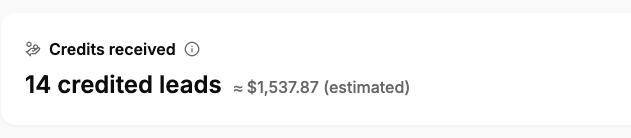
Reports show which leads were disputed and the actual amount of credit Google issued, so you can see what disputes really returned. See the case study: 74 credited leads →
Submitting a dispute is not the same as receiving a credit. Google decides eligibility, and some reasons, such as job type not serviced, do not receive credits. See Google's lead credit rules.
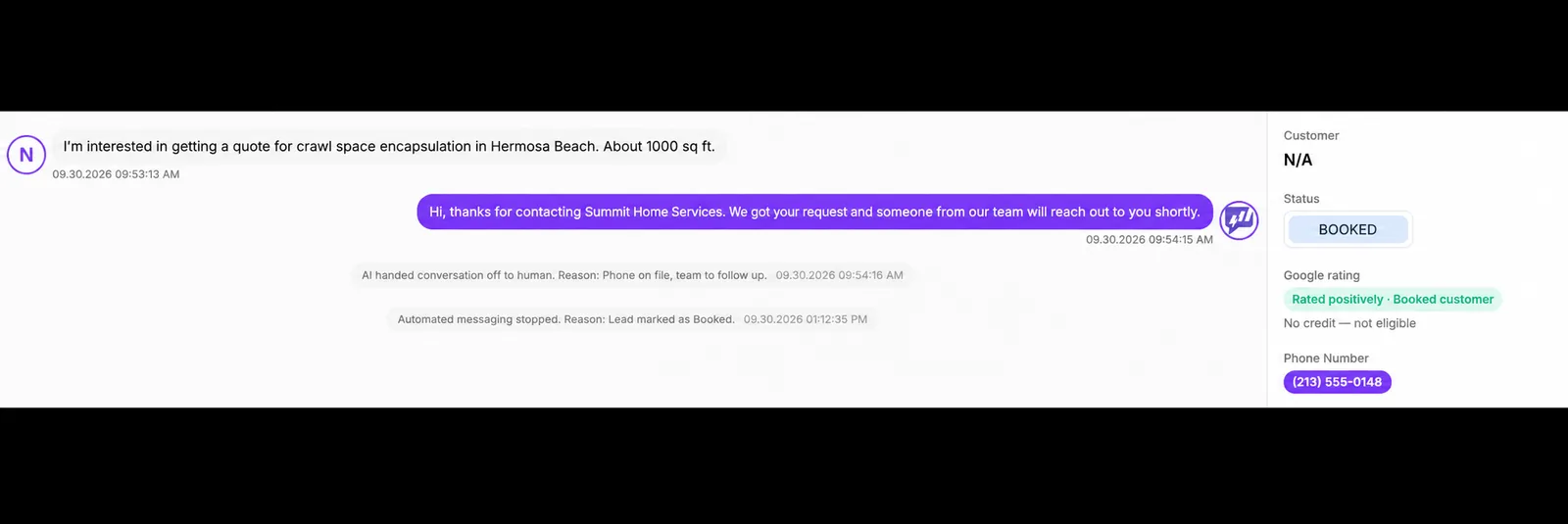
Example: a booked lead, rated positively
This captured record is marked Booked and rated positively. It also shows “No credit — not eligible.” The example illustrates lead rating and handoff, not a successful dispute.
LSA reporting and credits
Activity, costs, outcomes, disputes and credits received per campaign.
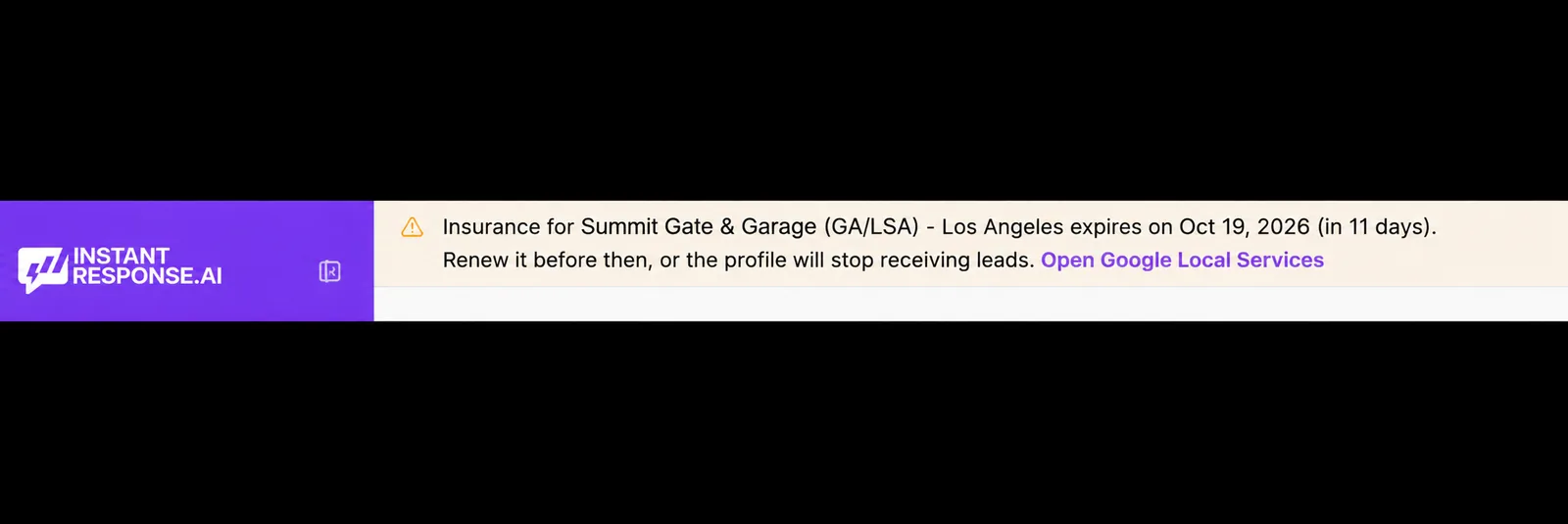
Verification documents
Alerts before your LSA verification documents expire.
InstantResponse.AI shows your Google LSA verification status and alerts you when a verification document, such as a license or insurance certificate, is approaching its expiration date, so you can renew it before your listing is affected. The capture below shows an alert for a document expiring on Oct 19, 2026, 11 days out.
Setup
How to set up the Google LSA Auto Responder.
Connect your LSA
Sign in with the Google account that owns your LSA profile. We set it up with you on the demo call.
Load your playbook
Add your services, hours, service area and, if you want, your prices. We can import them from your website or CRM.
Go live
New LSA message leads get a reply in seconds, 24/7, and per-campaign reporting starts on day one.
Before going live, test an incoming message and a handoff, and confirm who receives alerts. Per Google's documentation, message leads and call recordings are not available for health care verticals or tax specialists, and lead-inbox listening is US-only. See the LSA call review workflow.
Buyer checklist
What to look for in a Google LSA auto responder.
- Replies send from your own Local Services Ads account
- Faster, better replies, with no promised change to your LSA ranking
- You choose the pricing behavior: a flat service-call fee, estimates by service type, or no prices
- Every LSA call recorded, transcribed and summarized next to the message thread
- Escalation rules pass complex jobs to a person with full context
- Qualified leads reach ServiceTitan, Housecall Pro, Jobber, Workiz or GoHighLevel through Zapier or webhooks
Weighing this against an answering service or voicemail? Read AI Front Desk vs Answering Service vs Voicemail.
Who it is for
Built for home service pros who spend on LSA every month.
Plumbing and drain
Emergency jobs, where a fast answer often decides who gets the visit.
HVAC and electrical
Higher ticket work that needs qualifying questions before a quote.
Locksmiths and garage doors
Around the clock demand that no office schedule can cover.
Multi location operators
Route each LSA lead by service area and report per branch.
FAQ
Google LSA auto responder questions
- Google says enabling message leads gives customers more ways to reach you, especially on nights and weekends. InstantResponse.AI replies to those message leads in seconds, 24/7.
- Based on each company's public website, checked Oct 19, 2026: LeadTruffle connects to Google LSA through Google Ads sync or email forwarding, with replies advertised as within seconds, and LeadTruffle's pricing is not published (demo required). InstantResponse.AI replies to LSA message leads in seconds, 24/7, includes LSA call recordings, transcripts and AI summaries, and publishes pricing from $99/month with a 14-day free trial.
- Yes, for message leads. Replies go out under your own Local Services account, use your services, hours, coverage area and, if you want, your rates, and a person can take over any thread at any moment. Google recommends responding promptly to LSA leads, and this makes that the default rather than something that depends on who is near a phone.
- Yes to both. Google LSA message replies go out in seconds, 24/7, including nights and weekends, using the hours, services and qualifying questions you set, and anyone on your team can step into a thread at any point with the full conversation already in front of them.
- It answers a Google Local Services Ads message lead the moment it arrives, instead of whenever someone opens the LSA app. InstantResponse.AI replies in seconds, 24/7, under your own account, asks your qualifying questions, and hands the thread to your team once the job qualifies.
- Calls are still answered by your team. Every Google LSA call is recorded, transcribed and summarized by AI, right next to your message leads, so whoever calls back has the full context.
- It does not change what Google charges you. What it changes is how many of the leads you already paid for get a useful reply while the customer is still deciding who to talk to.
- You choose the pricing behavior: quote a flat service-call fee, give an estimate based on the type of service, or give no prices at all. When pricing is off, it collects the job details for your team.
- Yes. Leads that look like spam or solicitation are recognized, left unanswered, and marked so they never reach your inbox.
- Starter is $99/mo for one location, Growth is $199/mo for up to three locations, and Scale starts at $499/mo. Every plan includes a 14-day free trial, unlimited leads, and no per-message fees.
- No. Google Local Services Ads doesn't have built-in auto replies for message leads. InstantResponse.AI provides the auto replies for your connected LSA message leads, asks your qualifying questions and hands qualified jobs to your team. Phone calls are not answered with AI messages; you get the recording, transcript and AI summary instead.
- We don't promise any change to your LSA ranking. Google says ranking weighs your bid, relevance and profile quality, and that profile quality includes average response time. It also says missed calls may negatively affect your responsiveness. InstantResponse.AI replies to LSA message leads in seconds, 24/7, and records and transcribes LSA calls so your team can see what was missed. Google's ad ranking guidance.
- Google's Local Services Ads help center does not describe a single response score. It says ad ranking considers your responsiveness to customer inquiries and requests, that profile quality factors include average response time, and that missed calls may negatively affect your responsiveness. See Google's ad ranking guidance.
- Connect your Local Services account, add your services, service area, hours, qualifying questions and pricing mode, test a message and a handoff, then turn it on. Setup takes about 10 minutes, and you can start the 14-day free trial yourself or set it up with our team on a demo call.
- Yes. It works with any Local Services Ads account, including businesses with the Google Verified badge.
- Yes. InstantResponse.AI shows your Google LSA verification status and alerts you when your verification documents are approaching expiration, so you can update them in time. Google still reviews and approves every document.
- InstantResponse.AI automatically rates Google LSA leads and submits disputes for spam and unrelated-service leads. Reports show which leads were disputed and the actual amount of credit received. Credits are not guaranteed: a submitted dispute is not a promise of a credit. Google decides eligibility under its own policies, and leads disputed as job type not serviced do not receive credits.
- Yes. Qualified leads and appointment details are sent to ServiceTitan, Housecall Pro, Jobber, Workiz, GoHighLevel, and other tools through Zapier and/or webhooks.
- Every Google LSA call shows up in your dashboard next to your other leads and in the Calls tab, with the recording, a full transcript and an AI summary.
- A concise summary of what the customer needed, what was discussed, and a suggested next step so your team can follow up faster.
- Yes. Google LSA call recordings, transcripts, AI summaries, and duration are included with every plan.
- We recommend confirming the correct Google account and LSA profile, verifying message leads are available and enabled, reviewing your service area and job types, setting your questions, pricing mode and routing, testing an incoming message and a handoff, reviewing available call details separately, and confirming notification recipients and coverage hours. Google notes message leads are not available for health care verticals or tax specialists.
- Check that the correct Google account and LSA profile are connected and that message leads are enabled and available for your category. For call details, first check whether that call's data is available in Google for the selected profile.
- We set it up with you on the demo call: we connect your LSA account, load your services and questions, and turn it on. Most businesses see their first AI-answered LSA lead the same day.
Related
Keep exploring
How the two channels differ on lead intent, calls vs messages, costs and response.
A rollout plan for LSA messages, plus what to do with call recordings.
How automated lead response works across Yelp, Google LSA, and Thumbtack.
Track LSA leads to qualified leads and confirmed appointments.
The same instant replies on Yelp Requests.
Answer Thumbtack requests before the other pros do.
Stop losing LSA leads to slow replies.
If an LSA message lead arrives during your demo, see it handled live in your connected account. 15 minutes, no pressure.
Book a demo and leave with your 14-day free trial running.