
Industry · Restoration
Reply to restoration message leads the moment the water is still rising.
Mitigation work is won in the first few minutes after a loss. InstantResponse.AI replies to message leads immediately, records loss category, affected area, and insurance posture, and puts a complete picture in front of your crew chief.
A first-minute intake layer for restoration message leads, grounded in the mitigation services, coverage territory, and insurance policies you configure.
In short
InstantResponse.AI serves as an AI front desk for water damage and restoration contractors. It replies to message leads from Google Local Services Ads, Yelp, and Thumbtack within seconds, asks your configured questions about the water source, affected rooms, standing water, and insurance status, then notifies your on-call crew by email, SMS, or WhatsApp.
Restoration loss types
Which restoration losses does the AI intake?
A supply line break and a category three sewage loss demand different crews and different paperwork. Each loss type below carries its own question set, urgency grade, and team notification.
Burst pipe or supply line failure
EmergencyClean water spreading from a failed line, appliance, or fixture.
Sewage or contaminated water
EmergencyA backup involving grey or black water inside the property.
Storm, roof leak, and flood intrusion
UrgentWind-driven rain, a roof breach, or exterior flooding entering the building.
Mold and moisture concerns
StandardVisible growth, musty odour, or moisture found during a real estate transaction.
Insurance and claim questions
UrgentAn owner asking whether you bill their carrier or work with adjusters.
Commercial and multi-unit losses
UrgentA property manager, HOA, or business reporting a loss across units or floors.
Coverage and response-time questions
StandardSomeone confirming that you serve their address and how fast a crew can arrive.
Lead playbook
What does the crew know before the truck leaves?
The restoration playbook: what the property owner reports, what the AI asks, how the loss is graded, and what your mitigation team receives.
| Lead type | Information collected | Classification | How the customer is handled | What your team gets |
|---|---|---|---|---|
| Burst pipe or supply line failure | Water source, rooms affected, standing water depth, shutoff status, and occupancy. | Emergency | Asks whether the supply is shut off and follows your escalation rules. It offers no mitigation guidance. | Your team receives a scoped, ready-to-work thread. |
| Sewage or contaminated water | Backup source, affected floors, occupancy, vulnerable residents, and access. | Emergency | Applies your contamination notification rules so a category three loss reaches your crew lead right away. | Crew chief alerted with contamination category recorded in the thread. |
| Storm, roof leak, and flood intrusion | Entry point, ceiling or wall involvement, ongoing weather, and tarping needs. | Urgent | Captures whether intrusion is ongoing rather than estimating structural risk. | A prioritized thread with intrusion status and property type in place. |
| Mold and moisture concerns | Location, visible area, known past leaks, timeline pressure, and testing requests. | Standard | Separates a testing question from a remediation request using your configured rules. | Assessment requests reach your remediation lead instead of the emergency line. |
| Insurance and claim questions | Carrier name, claim number when available, deductible awareness, and adjuster contact. | Urgent | Answers only with the insurance handling policy you configure and makes no coverage promise. | Claim details captured before your office starts the file. |
| Commercial and multi-unit losses | Site address, unit count, business interruption pressure, access, and purchase-order rules. | Urgent | Applies your commercial approval rules rather than residential defaults. | Large-loss thread notification sent to the account owner you designate. |
| Coverage and response-time questions | Address, loss type, current severity, and whether the property is occupied. | Standard | Answers from the territory and response information you configure. | Out-of-territory requests filtered before a truck rolls. |
Burst pipe or supply line failure
Emergency- Information collected
- Water source, rooms affected, standing water depth, shutoff status, and occupancy.
- How the customer is handled
- Asks whether the supply is shut off and follows your escalation rules. It offers no mitigation guidance.
- What your team gets
- Your team receives a scoped, ready-to-work thread.
Sewage or contaminated water
Emergency- Information collected
- Backup source, affected floors, occupancy, vulnerable residents, and access.
- How the customer is handled
- Applies your contamination notification rules so a category three loss reaches your crew lead right away.
- What your team gets
- Crew chief alerted with contamination category recorded in the thread.
Storm, roof leak, and flood intrusion
Urgent- Information collected
- Entry point, ceiling or wall involvement, ongoing weather, and tarping needs.
- How the customer is handled
- Captures whether intrusion is ongoing rather than estimating structural risk.
- What your team gets
- A prioritized thread with intrusion status and property type in place.
Mold and moisture concerns
Standard- Information collected
- Location, visible area, known past leaks, timeline pressure, and testing requests.
- How the customer is handled
- Separates a testing question from a remediation request using your configured rules.
- What your team gets
- Assessment requests reach your remediation lead instead of the emergency line.
Insurance and claim questions
Urgent- Information collected
- Carrier name, claim number when available, deductible awareness, and adjuster contact.
- How the customer is handled
- Answers only with the insurance handling policy you configure and makes no coverage promise.
- What your team gets
- Claim details captured before your office starts the file.
Commercial and multi-unit losses
Urgent- Information collected
- Site address, unit count, business interruption pressure, access, and purchase-order rules.
- How the customer is handled
- Applies your commercial approval rules rather than residential defaults.
- What your team gets
- Large-loss thread notification sent to the account owner you designate.
Coverage and response-time questions
Standard- Information collected
- Address, loss type, current severity, and whether the property is occupied.
- How the customer is handled
- Answers from the territory and response information you configure.
- What your team gets
- Out-of-territory requests filtered before a truck rolls.
Illustrative example
What does a water loss conversation look like?
Read this carefully
An immediate reply, your configured loss and safety questions, insurance details captured as the customer reports them, and an urgent notification to your on-call crew lead.
How it works
How it works for a restoration contractor
Four steps, built only on lead sources and outcomes that exist today.
Connect your connected lead sources
Message leads from Google Local Services Ads, Yelp, and Thumbtack land in a single inbox.
Load your mitigation playbook
Services, territory, insurance handling policy, hours, and the loss questions your office asks on a first notice.
The AI replies and grades the loss
An immediate reply goes out, source and severity questions get asked, and follow-up continues until the owner responds or opts out.
Your crew chief takes the thread
Notifications reach the right person by email, SMS, or WhatsApp, a human can join at any moment, and outcomes can be pushed onward through Zapier and/or webhooks.
Google LSA call intelligence
Reviewing Google LSA restoration calls
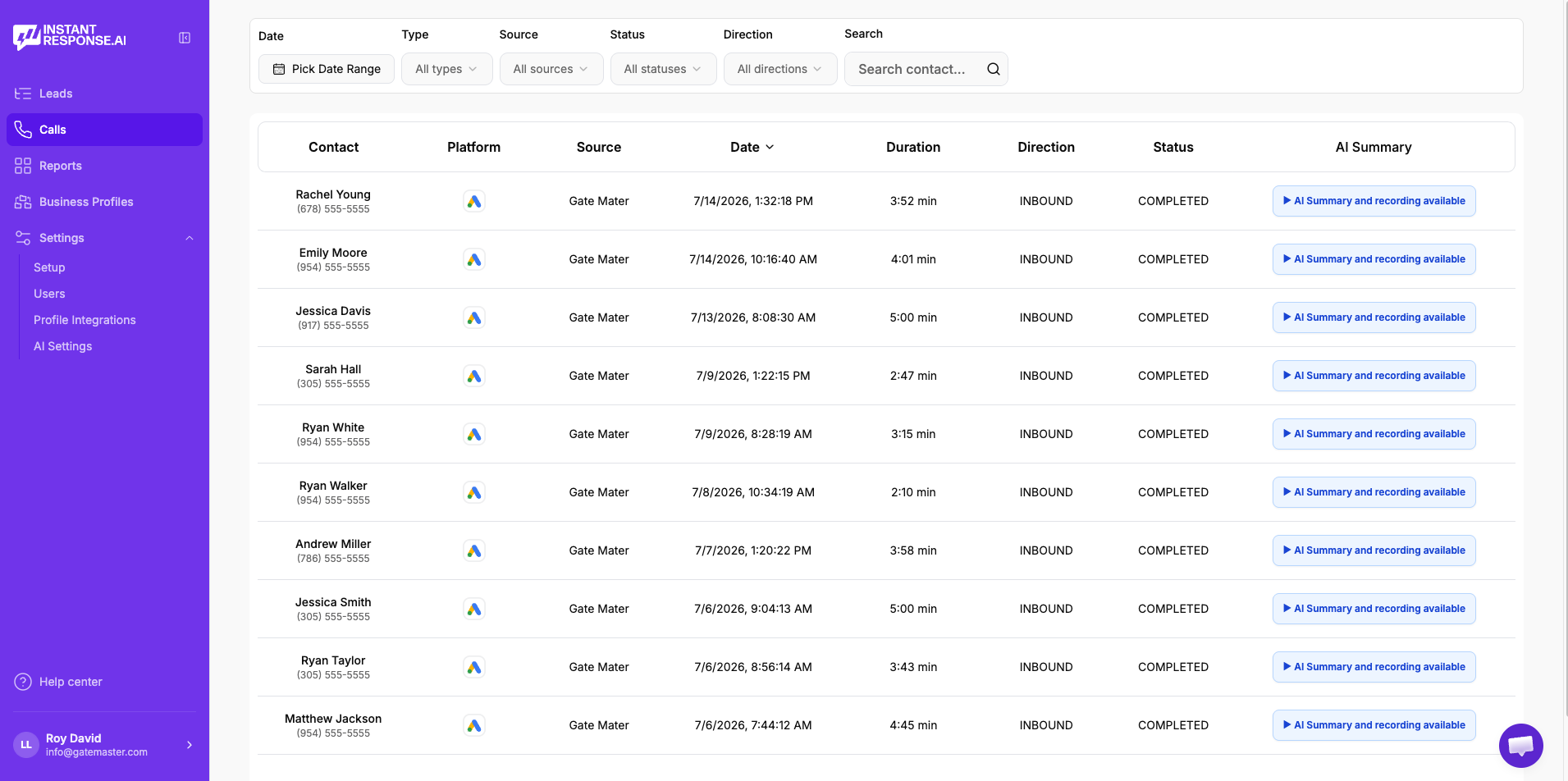
Property owners in a loss usually phone first. Eligible Google Local Services Ads calls available in the connected account can be replayed, read as a transcript, and summarized inside InstantResponse.AI.
Play the recording
Listen to the original Google LSA call without leaving the product.
Read the transcript
Skim the conversation instead of replaying the whole call.
Review the AI summary
See what the customer needed and what was discussed, in a few lines.
Check the duration
Spot the short, low-quality calls that are worth reviewing or disputing.
- Included in all pricing plans. Currently available specifically for Google Local Services Ads calls.
- See the full Google LSA workflow →
FAQ
Restoration lead response questions
- Message leads from Google Local Services Ads, Yelp, and Thumbtack get a reply within seconds at any hour, using the intake questions you configure.
- No. It records what the property owner reports, such as source and contamination signs, and your crew makes the determination on site.
- It answers using the insurance handling policy you configure and captures carrier, claim, and adjuster details, so your team starts the file with the paperwork already in hand.
- Your commercial notification rules apply immediately, so the account owner you designate is the one notified.
- Yes. Threads are shared, and a manager can step in silently at any point, with the conversation carrying on seamlessly.
- Eligible Google LSA calls are recorded, transcribed, and summarized inside the product, so you can replay the call, skim the transcript, and read the summary in one place.
Related
Related resources for restoration teams
Where most restoration calls and reviewable recordings begin.
Qualified-lead and confirmed-time outcomes by loss source.
Everything the AI front desk does across your lead sources.
Plans, included Google LSA call intelligence, and onboarding detail.
The trade most often on the other end of a water loss.
How teams use recordings, transcripts, and AI summaries.
How an AI front desk compares with a traditional answering service.
How automatic replies to message leads work end to end.
Voice AI on your existing number and full calendar booking are in Beta. Everything else described on this page is live today.
See it work a real loss inquiry.
Bring a recent water or mold message to a 15-minute demo and watch the reply, the captured loss details, and the alert your crew chief would have received.