
Industry · Garage Doors
Catch garage door repair leads while the car is still stuck inside.
A broken spring turns into a same-day purchase decision. InstantResponse.AI replies to message leads on the spot, records door and opener details, and hands your team a request that is ready to schedule.
An always-available intake layer for garage door message leads, grounded in the door lines, opener brands, and coverage you configure.
In short
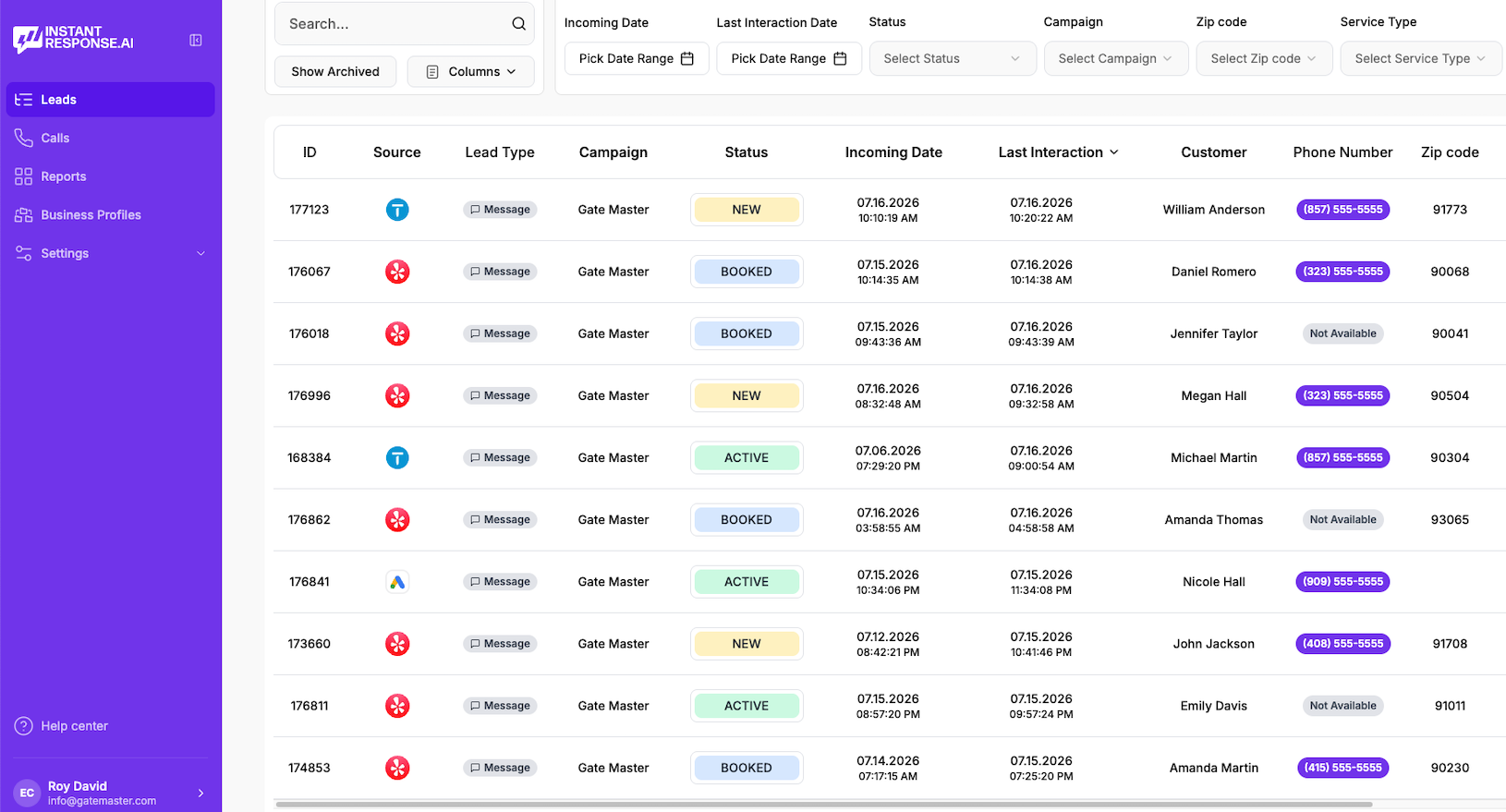
InstantResponse.AI works as an AI front desk for garage door companies. It answers message leads from Google Local Services Ads, Yelp, and Thumbtack in seconds, asks your configured questions about door style, opener brand, spring or cable symptoms, and whether a vehicle is trapped, then alerts your team by email, SMS, or WhatsApp for human follow-through.
Garage door lead types
Which garage door inquiries does the AI cover?
A snapped spring and a new-door quote are two different sales. Every request type below has its own configured questions, its own urgency grade, and its own handoff.
Broken spring or cable
EmergencyThe door will not lift, or a loud snap was heard in the garage.
Opener or remote failure
UrgentThe motor runs without moving the door, or remotes stopped responding.
Door off track or panel damage
EmergencyA vehicle hit the door, or the door jumped its track and jammed.
New door quote
StandardA homeowner or builder pricing a replacement door.
Commercial and rolling doors
UrgentA warehouse, dock, or storefront door blocking daily operations.
Tune-up and maintenance
PlannedNoisy operation, worn rollers, or a scheduled annual service.
Service area and pricing questions
StandardSomeone checking whether you cover their town and what a visit costs.
Lead playbook
What arrives with the lead before you schedule?
The garage door playbook: what the homeowner needs, what the AI asks, how the job is graded, and what your installer or service tech receives.
| Lead type | Information collected | Classification | How the customer is handled | What your team gets |
|---|---|---|---|---|
| Broken spring or cable | Door width, single or double spring, whether a car is trapped, and door age. | Emergency | Asks whether anyone is trying to force the door and states plainly that no repair instructions will be given. | Service tech notified with spring configuration and trapped-vehicle status in the thread. |
| Opener or remote failure | Opener brand, drive type, power status, and which controls still work. | Urgent | Collects the brand, drive type, and symptom your tech needs before the visit. | Your team receives a scoped, ready-to-work thread. |
| Door off track or panel damage | Impact cause, panel count, current door position, and whether the opening is secure. | Emergency | Applies your after-impact safety escalation rules exactly as configured. | An urgent thread with photos requested and damage scope described. |
| New door quote | Opening size, material and insulation preference, window options, and timeline. | Standard | Quotes only from the door lines and rate-card information you configure. | An estimator receives a scoped quote request with the opening size and door style captured. |
| Commercial and rolling doors | Site address, door count, rolling or sectional style, operating hours, and purchase-order requirements. | Urgent | Applies the commercial rules you configure for dock and gate work. | Commercial thread sent to the account owner you designate. |
| Tune-up and maintenance | Door age, last service, noise description, and preferred visit window. | Planned | Keeps maintenance out of the emergency queue while still replying immediately. | A steady stream of tune-up work captured alongside urgent jobs. |
| Service area and pricing questions | Address or zip code, door problem, and timing expectations. | Standard | Answers from the coverage area and rate-card information you configure. | Coverage questions answered up front, so callbacks go to addresses you serve. |
Broken spring or cable
Emergency- Information collected
- Door width, single or double spring, whether a car is trapped, and door age.
- How the customer is handled
- Asks whether anyone is trying to force the door and states plainly that no repair instructions will be given.
- What your team gets
- Service tech notified with spring configuration and trapped-vehicle status in the thread.
Opener or remote failure
Urgent- Information collected
- Opener brand, drive type, power status, and which controls still work.
- How the customer is handled
- Collects the brand, drive type, and symptom your tech needs before the visit.
- What your team gets
- Your team receives a scoped, ready-to-work thread.
Door off track or panel damage
Emergency- Information collected
- Impact cause, panel count, current door position, and whether the opening is secure.
- How the customer is handled
- Applies your after-impact safety escalation rules exactly as configured.
- What your team gets
- An urgent thread with photos requested and damage scope described.
New door quote
Standard- Information collected
- Opening size, material and insulation preference, window options, and timeline.
- How the customer is handled
- Quotes only from the door lines and rate-card information you configure.
- What your team gets
- An estimator receives a scoped quote request with the opening size and door style captured.
Commercial and rolling doors
Urgent- Information collected
- Site address, door count, rolling or sectional style, operating hours, and purchase-order requirements.
- How the customer is handled
- Applies the commercial rules you configure for dock and gate work.
- What your team gets
- Commercial thread sent to the account owner you designate.
Tune-up and maintenance
Planned- Information collected
- Door age, last service, noise description, and preferred visit window.
- How the customer is handled
- Keeps maintenance out of the emergency queue while still replying immediately.
- What your team gets
- A steady stream of tune-up work captured alongside urgent jobs.
Service area and pricing questions
Standard- Information collected
- Address or zip code, door problem, and timing expectations.
- How the customer is handled
- Answers from the coverage area and rate-card information you configure.
- What your team gets
- Coverage questions answered up front, so callbacks go to addresses you serve.
Illustrative example
What does a broken spring conversation look like?
Read this carefully
An immediate reply, the brand and symptom questions you configure, and a notification that gives your team the door type, the fault, and the address up front.
How it works
How it works for a garage door company
Four steps, from the first message to a qualified thread waiting for your team.
Connect your connected lead sources
Message leads from Google Local Services Ads, Yelp, and Thumbtack arrive in one inbox.
Load your garage door playbook
Door lines, opener brands you service, coverage map, hours, and the questions your office already asks on a spring call.
The AI replies and grades the job
An immediate reply goes out, door and opener questions get asked, and follow-up runs until the homeowner answers or opts out.
Your tech or estimator takes over
Notifications land by email, SMS, or WhatsApp, a person can join the thread whenever they want, and outcomes can move onward through Zapier and/or webhooks.
Google LSA call intelligence
Reviewing Google LSA garage door calls
Emergency door calls carry detail that rarely survives a text thread. Eligible Google Local Services Ads calls available in the connected account can be replayed, read, and summarized inside InstantResponse.AI.
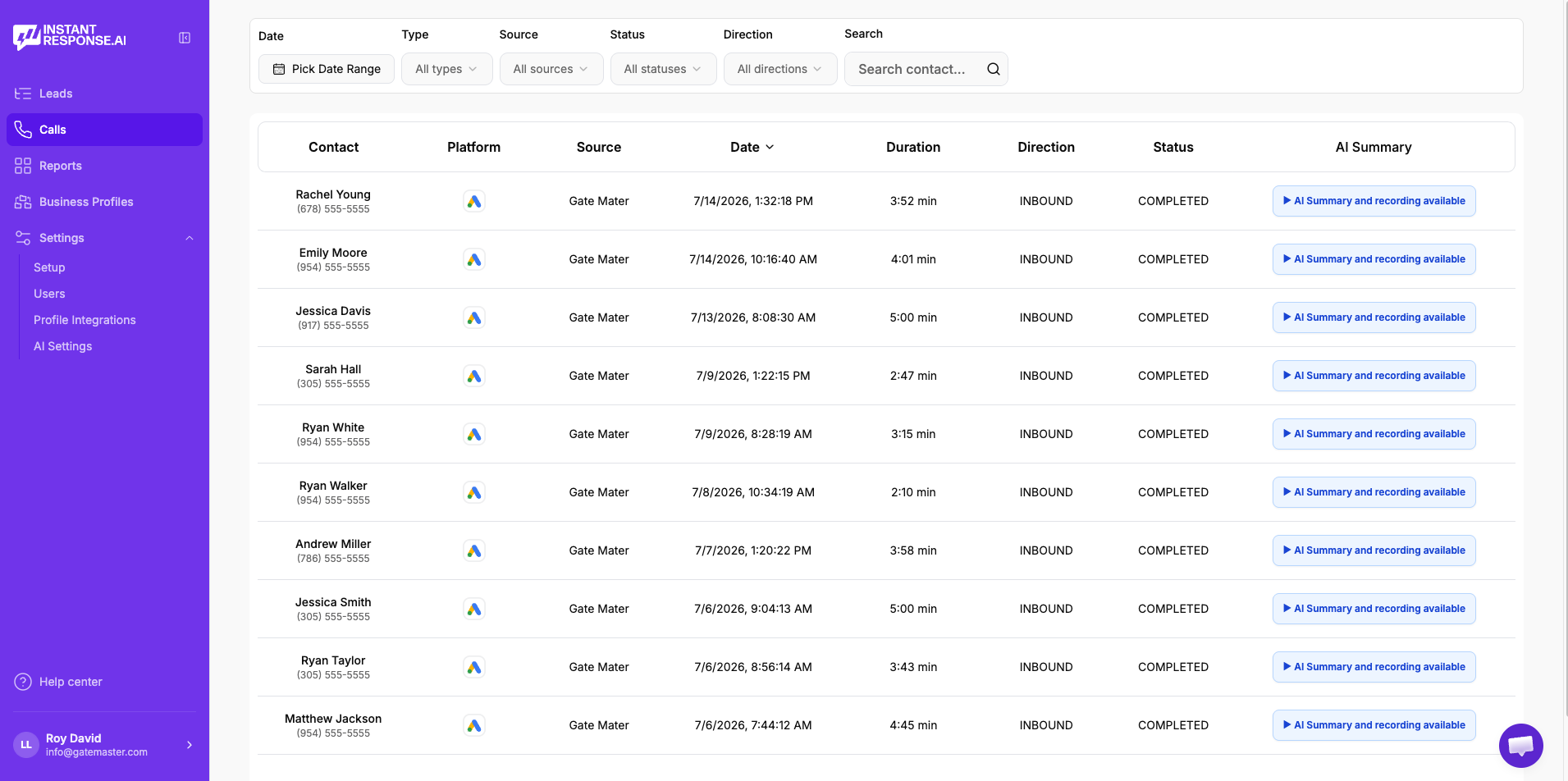
Play the recording
Listen to the original Google LSA call without leaving the product.
Read the transcript
Skim the conversation instead of replaying the whole call.
Review the AI summary
See what the customer needed and what was discussed, in a few lines.
Check the duration
Spot the short, low-quality calls that are worth reviewing or disputing.
- Included in all pricing plans. Currently available specifically for Google Local Services Ads calls.
- See the full Google LSA workflow →
FAQ
Garage door lead response questions
- Message leads from Google Local Services Ads, Yelp, and Thumbtack are answered within seconds, day or night, in the wording you configure.
- No. It gathers symptoms and details only. Repair guidance stays with your technicians, which keeps a homeowner away from a loaded spring.
- Yes. Trapped vehicles and off-track doors follow your emergency rules, while replacement quotes go into a standard queue so both get the right response.
- It can ask for a photo as part of the configured question set, and any image the customer sends stays attached to the thread your team opens.
- Yes. Threads are shared, and any team member can take over silently at any point and the conversation carries on seamlessly.
- Eligible Google LSA calls are recorded, transcribed, and summarized inside the product, so you can replay the call, skim the transcript, and read the summary in one place.
Related
Related resources for garage door teams
A frequent source of spring, opener, and replacement inquiries.
How email, SMS, and WhatsApp alerts reach the tech on call.
Everything the AI front desk does across your lead sources.
Plans, included Google LSA call intelligence, and onboarding detail.
A neighbouring trade with the same emergency intake pattern.
A buyer's framework for comparing the options.
How an AI front desk compares with a traditional answering service.
How automatic replies to message leads work end to end.
Voice AI on your existing number and full calendar booking are in Beta. Everything else described on this page is live today.
Watch it handle a real garage door inquiry.
Bring a recent spring or opener message to a 15-minute demo and see the reply, the captured door details, and the alert your team would have received.