

Thumbtack integration
Thumbtack Auto Responder: reply before the lead goes cold.
Thumbtack sends your lead to several pros at once. InstantResponse.AI replies to Thumbtack leads in under 5 seconds, 24/7 - nights and weekends covered - while the customer is still choosing. It asks only the questions you've approved, can quote a flat service-call fee or an estimate by service type (or give no prices), and follows up until the customer books.
If a Thumbtack lead arrives during your demo, see it handled live in your connected account · From $99/month · Unlimited leads · 14-day free trial · No contracts
 Yelp Advertising Platinum Partner
 Google Partner
InstantResponse.AI is a product by Cohen Marketing, a Yelp Advertising Platinum Partner and Google Partner.
Last updated: · Reviewed by Eliad Cohen
The InstantResponse.AI Thumbtack Auto Responder replies to Thumbtack leads in under 5 seconds, 24/7, asks only the questions you've approved and follows up until the customer books. Plans start at $99/month with a 14-day free trial, and setup takes about 10 minutes. Compare →
Trusted by service businesses across the US









Thumbtack customers contact several pros at once and are still comparing when the first real answer arrives. InstantResponse.AI replies in seconds while the customer is deciding, gets the job details, gives a price if you want it to, follows up until they book, and confirms a time that works.
Gate & Garage Masters runs its Thumbtack, Yelp and Google LSA leads from one InstantResponse.AI inbox. The AI sorts gate jobs from garage jobs and confirms a preferred time for the site visit.
Definition
What is a Thumbtack autoresponder?
A Thumbtack autoresponder answers a new Thumbtack lead the moment it arrives, instead of whenever someone opens the Thumbtack app. It greets the customer, uses the project details already in the lead, asks your scope questions, and moves the job toward a booked appointment.
InstantResponse.AI replies using the business details you set up: services, service area, hours, scope questions, handoff rules and, if you want, prices. When a job needs a person, anyone on your team can take over with the full conversation in front of them.
The AI can collect preferred appointment times for your team to confirm. Full calendar booking is in Beta; confirm availability during your demo.
Speed
Thumbtack response time and why it matters
Thumbtack customers usually contact several pros at once and hire one of the first to reply with a useful answer. A request that sits unread overnight or over a weekend gives another pro time to reply first.
InstantResponse.AI replies to Thumbtack leads in under 5 seconds, 24/7, from your own Pro account. The reply answers what the customer wrote and asks your scope questions, so being first also means being useful.
Buyer's checklist
What to look for in the best Thumbtack auto responder
Speed
A first reply in seconds, at any hour. InstantResponse.AI replies in under 5 seconds, 24/7.
Qualifying
Asks your scope questions (job type, address, urgency, photos, budget) and builds on the project details already in the lead.
Follow-ups
AI follow-ups at intervals you set (seconds to days), until the customer books or opts out.
Human handoff
Rule-based handoff with the full conversation, and anyone on your team can take over with one click.
Alerts
Team alerts by email, SMS and WhatsApp for new leads, goals achieved, AI handoffs and leads that stop replying.
Reports
Lead reports by hour, weekday, status, service type, source and ZIP code.
One inbox
Thumbtack leads in the same inbox as Yelp, Google LSA and your website chat widget.
Need wording for your first reply? Copy our Thumbtack auto reply examples →
Compare
How InstantResponse.AI compares
| What matters | InstantResponse.AI | LeadTruffle | Thumbtack Front Desk |
|---|---|---|---|
| Thumbtack connection | Thumbtack's official integration | Direct API | Built into Thumbtack |
| Thumbtack reply speed | Under 5 seconds | No figure published | On average, Front Desk responds within two minutes |
| Follow-ups | AI follow-ups at intervals you set (seconds to days) | SMS follow-ups for lead aggregators listed under the Growth plan | Not stated on the checked page |
| Price published? | Yes, from $99/month | Not published (demo required) | $60 to $500 per month depending on plan |
| Free trial | 14-day free trial | Not mentioned | Not stated on the checked page |
| Contracts | No contracts, cancel anytime | Month-to-month, no long-term contracts | Plan changes take two business days |
| Other lead sources | Google LSA, Yelp, Thumbtack, Website Chat Widget | Website texting widget and AI voice answering (per pricing page) | Thumbtack only |
Sources (checked Oct 15, 2026): instantresponse.ai/integrations/thumbtack · leadtruffle.co/thumbtack-autoresponder · help.thumbtack.com/article/what-is-front-desk · instantresponse.ai/features/ai-customization · leadtruffle.co/pricing · instantresponse.ai/pricing · instantresponse.ai/integrations
Based on each company's public website, checked Oct 15, 2026. Tell us if something changed: contact us.
Thumbtack Front Desk
How does this relate to Thumbtack Front Desk?
Thumbtack's own Front Desk is Thumbtack's automated lead response service. It sends the first message you customize on every lead, and Thumbtack says that on average, Front Desk responds within two minutes. InstantResponse.AI goes beyond a first message: it holds a configurable conversation with your scope questions, follows up until the customer books or opts out, and hands the thread to your team when a person is needed.
Thumbtack Front Desk
Thumbtack Front Desk vs. an AI auto responder
| What matters | InstantResponse.AI | Thumbtack Front Desk |
|---|---|---|
| What it is | AI auto responder that holds a configurable conversation | Thumbtack's automated lead response service |
| First reply | A reply to what the customer wrote, with your scope questions | Sends the first message you customize on every lead |
| Follow-up conversation | Customizable follow-ups until the customer books or opts out | Not stated on the checked page |
| Stated reply time | Under 5 seconds | On average, Front Desk responds within two minutes |
| Price | From $99/month, published on /pricing | $60 to $500 per month depending on plan |
| Channels covered | Google LSA, Yelp, Thumbtack, Website Chat Widget | Thumbtack only |
| How changes are made | You change settings in the app yourself | Message changes are requested through a form |
Sources (checked Oct 15, 2026): instantresponse.ai/integrations/thumbtack · help.thumbtack.com/article/what-is-front-desk · instantresponse.ai/pricing · instantresponse.ai/integrations
What happens when a request lands
A real conversation, not one canned message.
Sending the same canned line to every lead teaches customers to ignore you. InstantResponse.AI replies with real answers, plus a flat service-call fee or an estimate by service type if you turn pricing on, follows up until the customer books, and hands off to your team when the job needs a person. Qualified leads go straight to ServiceTitan, Housecall Pro, Jobber, Workiz or GoHighLevel through Zapier or webhooks.
What it does
Everything a great front desk does, on every Thumbtack lead.
Instant Thumbtack replies
Thumbtack leads get a reply in under 5 seconds, day or night - nights and weekends covered.
Captures scope and timing
Asks the right questions before you get involved so your estimator walks into a warm lead.
Same inbox as everything else
Thumbtack chats land in the same inbox as your Google LSA, Yelp, and Website Chat Widget leads - and, if connected, natively in Workiz.
Your rules
The AI only says what you've approved: you choose the questions it asks, whether it quotes prices, and when it hands off to a person.
Jump in any time
Take over any conversation with one click. The AI steps back automatically.
Time confirmation
Confirms a preferred day and time with the customer, without a phone call.
How the connection works
How the Thumbtack Auto Responder works.
Connect Thumbtack Pro
Connect your Thumbtack Pro account through Thumbtack's official integration. We set it up with you on the demo call.
Set your rules
Choose your scope questions, services, handoff rules and, if you want, prices.
Go live
New Thumbtack leads get a reply within seconds, and qualified jobs go to your team and your CRM.
Recommended checks before you turn it on
A checklist to work through together during onboarding.
- Connect the correct Thumbtack Pro account and location
- Confirm a test message lead reaches the connected account
- Review your services and service area
- Set your qualifying questions and pricing mode: flat service-call fee, estimate by service type, or no prices
- Review sample in-area, out-of-area and human-handoff conversations
- Confirm who on your team receives notifications
- Review the hours you want automation to run
Sends qualified Thumbtack leads into
Your existing CRM and dispatch.






Compare the options
Thumbtack auto responder vs canned autoresponder vs answering by hand.
Thumbtack sends most leads to several pros at once. Here's how the three ways of answering them compare.
| What matters | InstantResponse.AI | Canned autoresponder | Answering by hand |
|---|---|---|---|
| First reply time | Seconds, any hour | Seconds, but one message only | Minutes to hours, business hours only |
| Scope capture | Asks job type, urgency, and location upfront | None | Depends on who replies |
| Pricing in the reply | Flat service-call fee, estimate by service type, or no prices | Generic ranges or none | Accurate when the right person answers |
| Follow-up on quiet threads | Automatic nudges until the customer books or opts out | None | Usually forgotten |
| Handoff to a person | Rule based, with full thread context | Not applicable | Already a person |
| CRM handoff | Qualified leads via Zapier or webhooks | None | Manual retyping |
| Spam and solicitation | Recognized, left unanswered, and marked as spam | Answered anyway | Wastes your team's time |
| What your team receives | A qualified thread with the full transcript by SMS, WhatsApp, or email | Nothing | Whatever the person taking it writes down |
What your team sees
A qualified Thumbtack thread reaches the crew instantly.
When a Thumbtack request qualifies, the scope details and full conversation go out by WhatsApp, SMS, or email so an estimator can pick it up without opening another app.
 WhatsApp1:08 PM
New lead from Thumbtack
Business: Sunrise Lock & Key
Customer: Jordan M.
Phone: +1 (555) 014-2288
Address: 90004
Service requested: Installing or replacing locks
View lead: app.instantresponse.ai/leads
Sunrise Lock & Key - lead qualified
Customer: Jordan M.
Phone: +1 (555) 014-2288
Notes: Customer wants help with a front door lock and magnetic latch adjustment. Residential property, standard lock installation or replacement.
Please contact the lead as soon as possible.
New lead from Thumbtack
Business: Bright Carpet Care
Customer: Alex R.
Phone: +1 (555) 018-7340
Service requested: Clean upholstery
View lead: app.instantresponse.ai/leads
Bright Carpet Care - lead qualified
Notes: Upholstery cleaning for a two-person recliner, an office chair, a mattress, and patio cushions. Primary reason: odor and allergen reduction.
Please contact the lead as soon as possible.
Northside Remodeling - lead qualified
Source: Thumbtack
Customer: Casey T.
Phone: +1 (555) 012-6906
Service requested: General contracting
Notes: Remodeling project involving a permanent roof over an existing patio, extended paver patio, and added posts for roof support.
Message sent to the customer
Sample alerts. Business names, customer names, and phone numbers are fictional.
Buyer checklist
What to look for in a Thumbtack auto responder.
- Replies come from your own Thumbtack Pro account, not a third party inbox
- You choose the pricing behavior: a flat service-call fee, estimates by service type, or no prices
- Qualifying questions capture scope before an estimator gets involved
- Follow-ups continue until the customer books, and stop the moment they opt out
- Escalation rules hand complex jobs to a human with the full conversation
- Qualified leads reach your CRM through Zapier or webhooks without retyping
Want to see what a strong first message looks like? Browse our copy-and-paste auto reply message examples, including three written for Thumbtack.
Comparing this against an answering service or plain voicemail? Read AI Front Desk vs Answering Service vs Voicemail, or see how the same workflow runs on the Yelp Auto Responder and Google Local Services Ads.
Troubleshooting
Common Thumbtack setup issues and what to check.
No incoming messages
Check that the correct Thumbtack Pro account and location are connected, and that incoming messages are enabled for that profile.
Wrong job, area or price
Review the services and service area you set, and which pricing option you chose: a flat service-call fee, an estimate by service type, or no prices. See how to respond to Thumbtack leads faster.
Human takeover or notifications
Review your routing and handoff settings and who receives alerts. See how to respond to Thumbtack leads faster.
What your team sees
Thumbtack leads in the same inbox as Yelp and Google LSA.
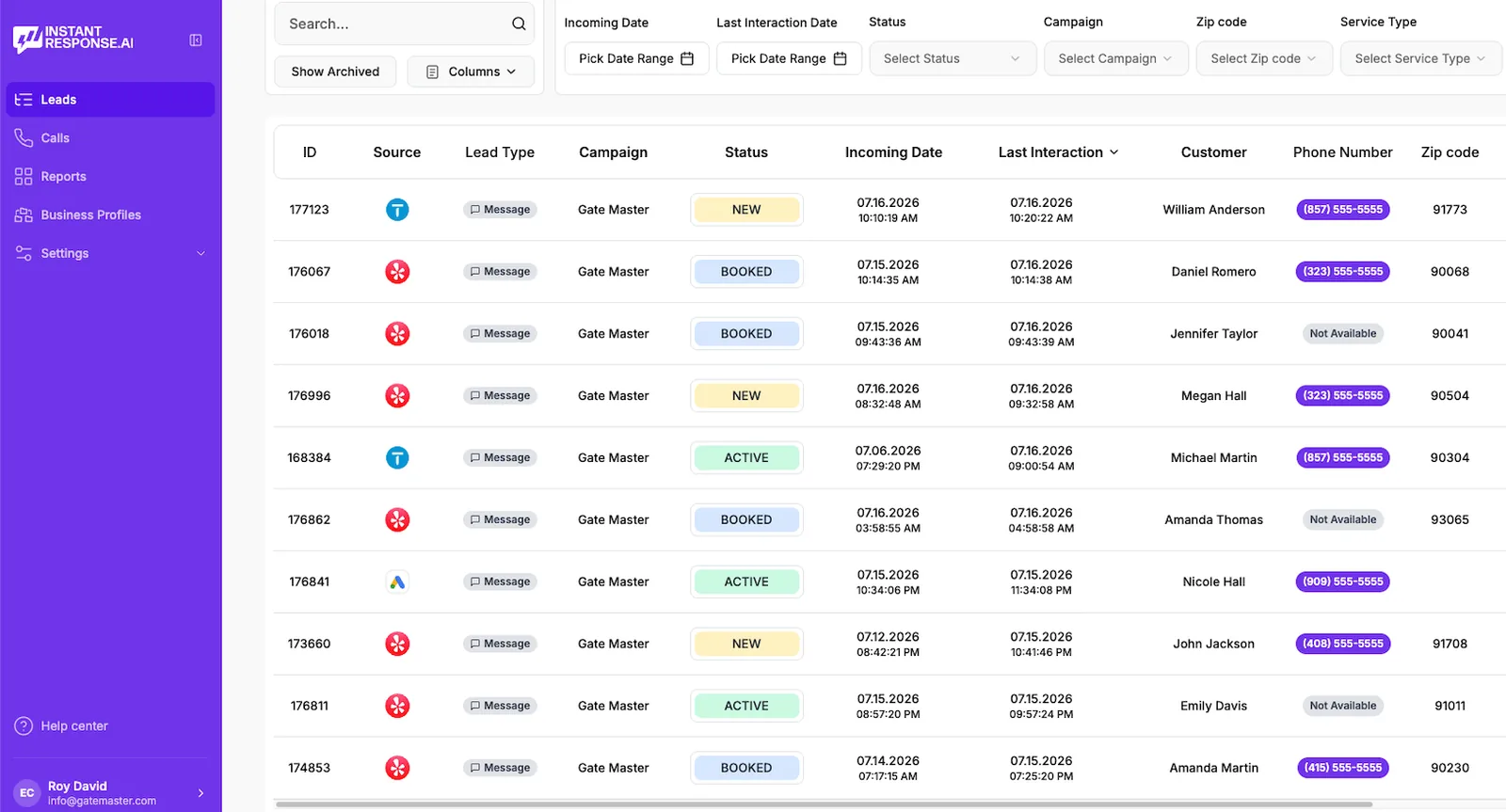
Product screenshot of the InstantResponse.AI leads inbox; it is not a customer performance case study.
Who it is for
Built for home service pros who buy Thumbtack leads every month.
Electricians
Panel upgrades and EV charger installs where scope questions decide the quote.
Moving and junk removal
High volume Requests where a prompt, useful first answer keeps the conversation active.
Handyman and remodeling
Multi task jobs that need scope captured before anyone drives out.
Cleaning services
Recurring work where availability and price anchors close the deal fast.
FAQ
Thumbtack auto responder questions
- The best one replies in seconds at any hour, qualifies the job, follows up, hands off to a person at the right moment, alerts your team and keeps Thumbtack in one inbox with your other sources. InstantResponse.AI replies to Thumbtack leads in under 5 seconds, 24/7, does all of that, and also covers Google LSA, Yelp and your website chat widget, from $99/month with a 14-day free trial.
- Connect your Thumbtack Pro account through Thumbtack's official integration, set your services, service area, scope questions and handoff rules, then go live. New Thumbtack leads get a reply in under 5 seconds, and qualified jobs go to your team. Setup takes about 10 minutes.
- Yes. Thumbtack Front Desk is thumbtack's automated lead response service: it sends the first message you customize on every lead, and Thumbtack says that on average, Front Desk responds within two minutes. It costs $60 to $500 per month depending on plan (per Thumbtack's help page, checked Oct 15, 2026).
- As fast as you can, ideally within seconds. Thumbtack customers usually contact several pros at once and hire one of the first to reply with a useful answer. InstantResponse.AI replies in under 5 seconds, 24/7, nights and weekends included.
- Yes. InstantResponse.AI answers Thumbtack leads from your own Pro account in under 5 seconds, after hours included, asks your scope questions, and notifies your team once the job qualifies. Qualified leads can go to your CRM through Zapier or webhooks, and you can take over any conversation at any moment.
- The reply uses your own wording, services, coverage area and, if you want, rates, and it responds to what the customer actually wrote rather than sending one fixed line. If a question falls outside your rules, it collects the details and hands the thread to a person instead of guessing.
- It answers a Thumbtack lead the moment it arrives, instead of whenever your team next checks the app. InstantResponse.AI replies in under 5 seconds from your own Pro account, asks your qualifying questions, and hands the conversation to your team once the job qualifies.
- Thumbtack customers usually contact several pros at once and hire one of the first to reply with a useful answer. Replying in seconds keeps you in the running while they're still deciding.
- Whatever you choose: job type, address, urgency, photos, property details, and budget range. Your team receives the answers with the full transcript.
- You choose the pricing behavior: quote a flat service-call fee, give an estimate based on the type of service, or give no prices at all. When pricing is off, it collects the job details for your team.
- Yes. Leads that look like spam or solicitation are recognized, left unanswered, and marked so they never reach your inbox.
- Front Desk is Thumbtack's automated lead response service: it sends the first message you customize on every lead, and Thumbtack says that on average, Front Desk responds within two minutes. It costs $60 to $500 per month depending on plan and works on Thumbtack only. InstantResponse.AI replies in under 5 seconds, holds a conversation with your scope questions, follows up until the customer books or opts out, and also covers Google LSA, Yelp and your website chat widget.
- Thumbtack's help center says that on average, Front Desk responds within two minutes (checked Oct 15, 2026). InstantResponse.AI replies to Thumbtack leads in under 5 seconds.
- Based on each company's public website, checked Oct 19, 2026: LeadTruffle connects to Thumbtack by direct API, with no figure published for Thumbtack reply speed, and LeadTruffle's pricing is not published (demo required). InstantResponse.AI replies in under 5 seconds and publishes pricing from $99/month with a 14-day free trial.
- Only when you really need it. Thumbtack leads already include contact and project details, so the reply should build on them instead of making the customer repeat themselves. Ask for extra details only when the job needs them.
- Run a few realistic scenarios: an in-area job, an out-of-area request, a pricing question and a customer who asks for a person. Check that each reply uses the project details, asks your scope questions and hands off at the right moment, then turn on your chosen schedule.
- Starter is $99/mo for one location, Growth is $199/mo for up to three locations, and Scale starts at $499/mo. Every plan includes a 14-day free trial, unlimited leads, and no per-message fees.
- Yes. InstantResponse.AI connects through Thumbtack's official integration, and replies go out from your own Thumbtack Pro account, just as if your team typed them.
- Yes. You choose the services it handles, the questions it asks and when it hands off. Anything outside your rules goes straight to a person.
- Thumbtack customers want fast, useful replies, and that's what every lead gets. We don't promise specific score changes.
- Every conversation is saved, so it's easy to see what happened before you dispute a lead. Thumbtack decides refunds under its own policies.
- Yes. Any team member can jump in silently — the AI hands the thread over and stays out of the way.
- We recommend confirming the correct Thumbtack Pro account and location, checking that a test message lead reaches it, reviewing your services and service area, setting your questions and pricing mode, reviewing sample in-area, out-of-area and handoff conversations, and confirming who receives notifications and which hours automation runs.
- Check that the correct Thumbtack Pro account and location are connected and that incoming messages are enabled for that profile. If leads arrive but are handled wrongly, review your services, service area, pricing option and handoff settings.
- We set it up with you on the demo call: we connect your Thumbtack account, load your services and questions, and turn it on. Most businesses see their first AI-answered lead the same day.
Related
Keep exploring
What to say first, how to cover after hours, and follow ups that read naturally.
How this compares with a traditional contractor answering service.
How automated lead response works across Yelp, Google LSA, and Thumbtack.
The same instant replies on Yelp Requests.
Message replies plus LSA call recordings and summaries.
Common for panel upgrades and EV installs.
A top channel for junk hauls.
How the AI asks scope questions.
Ready to stop losing Thumbtack leads?
If a Thumbtack lead arrives during your demo, see it handled live in your connected account. 15 minutes, no pressure.
Book a demo and leave with your 14-day free trial running.